(Sep 03, 2009 01:35:52)Starting activation process.
(Sep 03, 2009 01:35:52)Performing interactive activation.
(Sep 03, 2009 01:35:52)MATHWORKS ACTIVATION IS STARTING UP.
(Sep 03, 2009 01:35:54)com.mathworks.instutil.JNIException: java.lang.UnsatisfiedLinkError: Cant load library: /Applications/MATLAB_R2009a.app/bin/maci64/libinstutil.jnilib
java.lang.UnsatisfiedLinkError: Cant load library: /Applications/MATLAB_R2009a.app/bin/maci64/libinstutil.jnilib
com.mathworks.instutil.NativeUtility.(NativeUtility.java:30)
com.mathworks.instutil.MachineInfo.(MachineInfo.java:41)
com.mathworks.activationclient.model.ActivationModelImpl.loadNativeLib(ActivationModelImpl.java:228)
com.mathworks.activationclient.model.ActivationModelImpl.getMachineInfo(ActivationModelImpl.java:211)
com.mathworks.activationclient.view.ApplicationViewImpl.getMachineInfo(ApplicationViewImpl.java:260)
com.mathworks.activationclient.view.ApplicationViewImpl.showGUI(ApplicationViewImpl.java:116)
com.mathworks.activationclient.controller.ApplicationControllerImpl.start(ApplicationControllerImpl.java:118)
com.mathworks.activationclient.ActivationClientImpl.start(ActivationClientImpl.java:210)
com.mathworks.activationclient.ActivationApplication.goInteractive(ActivationApplication.java:186)
com.mathworks.activationclient.ActivationApplication.go(ActivationApplication.java:172)
com.mathworks.activationclient.ActivationApplication.main(ActivationApplication.java:135)
(Sep 03, 2009 01:35:54)java.lang.NullPointerException
com.mathworks.activationclient.view.ApplicationViewImpl.showGUI(ApplicationViewImpl.java:116)
com.mathworks.activationclient.controller.ApplicationControllerImpl.start(ApplicationControllerImpl.java:118)
com.mathworks.activationclient.ActivationClientImpl.start(ActivationClientImpl.java:210)
com.mathworks.activationclient.ActivationApplication.goInteractive(ActivationApplication.java:186)
com.mathworks.activationclient.ActivationApplication.go(ActivationApplication.java:172)
com.mathworks.activationclient.ActivationApplication.main(ActivationApplication.java:135)
(Sep 03, 2009 01:36:10)There was an unexpected exception:
null
Then I checked the MATLAB_R2009a.app (right click => Show Package Content), and found that
there was no such directory "bin/maci64", but only "bin/maci".
So I copied and renamed it to "maci", ran the installation again. This time I got another exception:
(Sep 03, 2009 12:26:51)com.mathworks.instutil.JNIException: java.lang.UnsatisfiedLinkError: /Applications/MATLAB_R2009a.app/bin/maci64/libinstutil.jnilib: no suitable image found. Did find: /Applications/MATLAB_R2009a.app/bin/maci/libinstutil.jnilib: mach-o, but wrong architecture /Applications/MATLAB_R2009a.app/bin/maci64/libinstutil.jnilib: mach-o, but wrong architecture
java.lang.UnsatisfiedLinkError: /Applications/MATLAB_R2009a.app/bin/maci64/libinstutil.jnilib: no suitable image found. Did find: /Applications/MATLAB_R2009a.app/bin/maci/libinstutil.jnilib: mach-o, but wrong architecture /Applications/MATLAB_R2009a.app/bin/maci64/libinstutil.jnilib: mach-o, but wrong architecture
...
This "wrong architecture" message reminded me to turn to Java settings for the final trial.
(After all, the activation program was written in Java :p)
And it worked!!
Here's the solution:
1. Use Finder to go to /Applications/Utilities/Java Preferences.
2. In the Java Application section, set 32-bit as the first priority over the 64-bit by dragging it upward.
3. Run the MATLAB R2009a installation again.
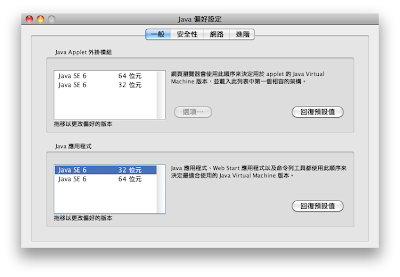
As I remember, Java in
Leopard had the
Java SE 5 (32-bit) as the first priority, but Snow Leopard does not! (all Java SE 6, and 64-bit first)
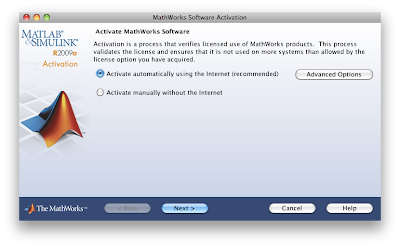
Hopefully you will finally see this activation window. I believe everyone knows what to do next :DD
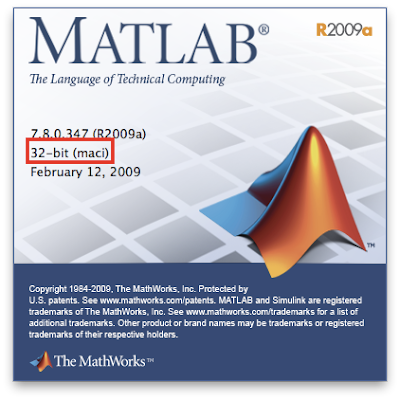
Upon success, you can see that MATLAB R2009a runs in 32-bit mode.
I also saw some good news about the coming
R2009b release from
MATLAB Central blog.
The R2009b will be a 64-bit version, and will move one step closer to being entirely independent of X11. However the latter is going to take another couple of releases to accomplish...
I really look forward to the day when 64-bit + native MATLAB application become possible :)


